A Genspark alternative for one workspace, from research to finished assets

Compare Vife as a Genspark alternative for an all-in-one AI workspace with agent planning, browser work, research, slides, documents, and media creation.

Vife vs. Genspark: workspace, pricing and usage limits

Both products bring research, slides, documents and media into an AI workspace. Compare the workflow you will actually use, the included allowances and the features that need a separate subscription.

Published by Vife using official product pages, live pricing screens and membership documentation. No matched performance test was run, and a listed capability does not establish equal output quality.

Vife vs. Genspark: workspace, pricing and usage limits
What to compareVifeGenspark
Paid plans · monthly billing

Plus: US$12/month, billed monthly, with 3,000 monthly credits and 3 concurrent agent runs. Pro: US$30/month with 9,000 credits; Ultra: US$120/month with 40,000 credits.

Plus starts at US$24.99/month with 10,000 monthly credits and 50 GB of AI Drive storage. Pro starts at US$249.99/month with 125,000 credits and 1 TB. Plus annual billing shows US$239.99 paid for the year (displayed as US$19.99/month).

Included usage and its limits

Basic is US$0 with 40 one-time starter credits, no card required, and 1 concurrent agent. Browser automation, document/spreadsheet processing and premium media models require a paid plan.

Plus and Pro include a weekly Free Quota for covered Standard-mode text and image tasks; this is a paid-plan benefit. When it runs out, tasks automatically use credits unless you enable Ask First. Flagship models and generated video/audio use credits. Older uninterrupted subscriptions have separate transitional terms.

Research, documents and slides

An Agent project can connect research with reports, documents, presentations and follow-up edits. The research-to-business-report playbook defines the question, audience, sources and deliverable before execution.

The workspace lists Super Agent, AI Slides, AI Sheets, AI Docs, Deep Research and Fact Check. It also advertises Google Workspace and Microsoft 365 add-ins. If you work mainly inside an office suite, check those integrations against your required editing and export workflow.

Browser and computer workflows

The companion extension lets the Agent work in signed-in Chrome tabs in a dedicated Vife tab group. It requires the extension, user-authorized browser access and a plan with browser automation.

Genspark Claw runs on Genspark Cloud Computer and requires an active Cloud Computer subscription. Some Claw actions also consume the shared Genspark credit balance. Check that separate runtime cost before comparing it with a local browser-extension workflow.

Media production

The product-URL workflow connects product research with a video brief, creative angles and media production. Review the product facts and production plan before generating the ad; model, duration and settings affect credits.

Genspark lists AI Image, AI Video, AI Music, AI Audio and podcast tools. Its Standard-mode allowance can cover planning, while generated video and audio still consume credits. Compare the exact model, duration and revision cost for your brief.

USD prices were checked on the date above; taxes and local checkout charges may differ. Monthly billing and an annual plan's monthly equivalent are different commitments. Credits are not interchangeable between platforms, and Genspark's included quota means raw credit totals alone cannot establish value. Recheck the linked membership terms before subscribing.

Choose around your main deliverable

Consider Vife for a brief-to-assets project

Its product-video and campaign playbooks are useful starting points when research, a reviewed production plan, generated media and follow-up files belong to the same project. Start with a bounded task and its required paid features.

Consider Genspark for its office tools and included Standard-mode usage

AI Sheets, office add-ins, AI Drive and the weekly allowance may matter more than the subscription's headline price. Check integration availability, model eligibility and what happens after the included quota runs out.

A public reference and a workflow to evaluate

A reference clip shows an output style; a playbook defines a process. Neither establishes that one platform outperforms the other on the same task.

A product-video reference you can inspect

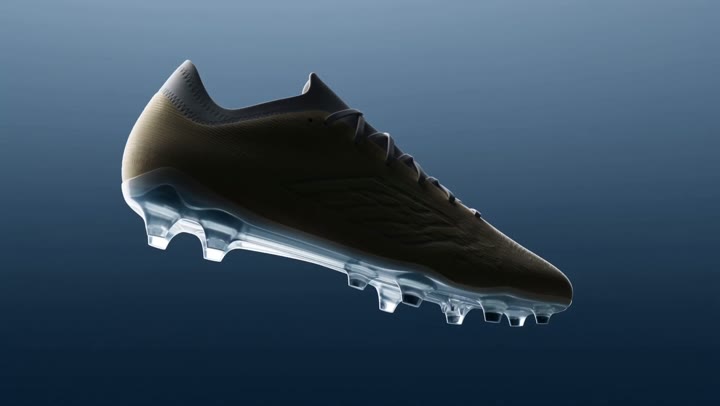
Vife's public gallery includes “Zero-Gravity Soccer Cleat”: a short product reveal with a rotating shoe, material close-ups and a reusable prompt. The original is Krea's public Seedance 2.5 example. This is a curated third-party reference, not a Vife-generated customer result. Use it to discuss camera movement, texture and the closing product shot before making your own ad.


Research to a business report: a reproducible brief

Use Vife's public playbook to define one decision, a target reader and a small set of sources. Ask for an evidence table and an executive memo, then one correction and a slide outline. This is a workflow template you can run in either workspace, not a published customer case or a measured time saving.

Compare one complete job, including the revision

Use the same three source pages and request a cited two-page report plus a five-slide outline. Revise one price and one recommendation. Compare source accuracy, file editability, layout cleanup and final credits used; also record whether included quota paid for any Genspark steps. For video, add the same duration, aspect ratio and model where available. This is an evaluation checklist, not a claimed test result.

Start with an example

Glass Lip Balm Product Close-Up
Video

Glass Lip Balm Product Close-Up

Perfume Unboxing ASMR
Video

Perfume Unboxing ASMR

The Chrome City
Video

The Chrome City

LED Mask GRWM
Video

LED Mask GRWM

The Grand Pink Hotel
Video

The Grand Pink Hotel

A Quiet Morning in Pure Cotton
Video

A Quiet Morning in Pure Cotton

The Ship Beneath Brooklyn Bridge
Video

The Ship Beneath Brooklyn Bridge

Zero-Gravity Soccer Cleat
Video

Zero-Gravity Soccer Cleat

Fire Dragon Over the Frozen Fjord
Video

Fire Dragon Over the Frozen Fjord

Pizza Ingredients in Midair
Video

Pizza Ingredients in Midair

San Francisco Color Burst
Video

San Francisco Color Burst

The Mahjong Noodle Ritual
Video

The Mahjong Noodle Ritual

Versailles After Dark
Video

Versailles After Dark

The Perfect Espresso Pour
Video

The Perfect Espresso Pour

Blue Hour Warehouse Session
Video

Blue Hour Warehouse Session

Fire Wok
Video

Fire Wok

The Glowing Mushroom Gardeners
Video

The Glowing Mushroom Gardeners

Inside the Golden Wave
Video

Inside the Golden Wave

Balloons Above the Morning Fog
Video

Balloons Above the Morning Fog

Summer Bubbles in the Open Field
Video

Summer Bubbles in the Open Field

When New York Traffic Floats
Video

When New York Traffic Floats

Red Dress on the Edge
Video

Red Dress on the Edge

Underwater Portrait in Motion
Video

Underwater Portrait in Motion

Neon Rain Turn
Video

Neon Rain Turn

Start with a concrete task

Turn a project brief into finished business output

A useful comparison starts with the work you need to finish, not a feature checklist. Give Vife the brief and inspect the first deliverable.

Example brief

Use these notes and approved sources to write a decision-ready business report for [audience]. Include a concise executive summary, a table of evidence, implications, recommendations, and the questions the team should validate next.

What the first run should return

  • Structured report with executive summary
  • Evidence, limitations, and assumptions
  • Recommendations ready for follow-up work
Start with a business report

Built for delegated AI work

Vife turns goals into projects: the agent plans, uses tools, creates files, and keeps the working context attached.

All-in-one AI workspace

Bring chat, agent planning, files, research, slides, documents, and media into one Vife project.

Plain-language task delegation

Describe the work you need, then let Vife structure the steps and produce a first result you can edit.

Useful files, not isolated answers

Vife is built to create outputs you can keep working on: decks, docs, reports, visuals, videos, and audio.

Agent workflows for creators and teams

Use one workspace for research, planning, writing, presentation work, and production-ready assets.

Workflows Vife can take on

Vife is built for delegated work: planning, research, browser context, file creation, and follow-up edits in one place.

01

AI workspace for business output

Generate reports, briefs, decks, proposals, and analysis from a single project prompt.

02

AI workspace for creators

Plan a campaign and produce visuals, videos, voiceovers, and copy without switching tools.

03

AI workspace for research

Investigate a topic, compare information, and convert findings into slides or documents.

04

AI workspace for follow-up edits

Keep improving the output with the same context instead of restarting in a new tool.

Frequently asked questions

Is Vife a Genspark alternative?

Vife is an alternative for users looking for an AI workspace where agents can plan tasks, research, create files, and continue project work.

How is Vife different from Genspark?

Vife emphasizes agent-led project work across browser tasks, research, documents, slides, and multimodal creation in a single workspace.

Can Vife create the same kinds of outputs?

Vife can create many common AI workspace outputs, including reports, documents, slide decks, images, videos, audio, and short-form content.

Does Vife have an AI browser workflow?

Yes. Vife has a Browser Companion path for user-authorized local browser workflows.

Who is Vife best for?

Vife is best for people who want an AI agent workspace that turns goals into editable deliverables and keeps work organized by project.